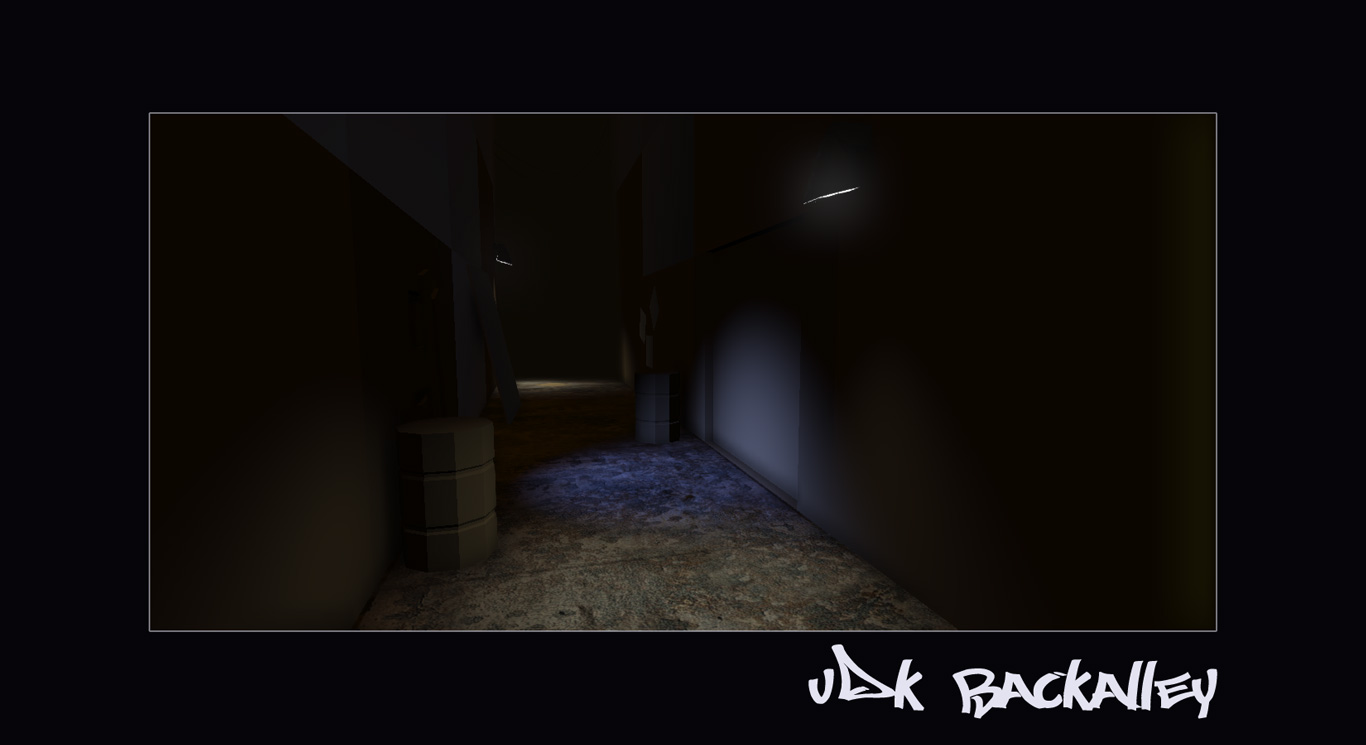
Heey hey Guys =)
So.. yip.. mmm.. jus more work on the area really.. more texturing and high poly, not very good at it.. but just trying to get the overall feel going =) Tweaked the lightmap quality up to 128 pixels (you do this through the mesh properties if anyone's interested). =) Going to continue with this tomorrow.. although we got lectures/tutes, so may be too tired =)
C&C most welcome! Be harsh! =)
Cheers Cheers! =)
Showing posts with label Maya. Show all posts
Tuesday, 18 October 2011
Sunday, 16 October 2011
UDK Backalley Preview (Uni Work)
Hey Guys! =)
Started to work on the lighting and ambience for the alley. C&C welcome =)
Made some quick emissive maps for the street lamps. An emissive map makes things glow in the Unreal engine. You can make a copy of your diffuse map, and then anything you want to glow, paint it white or some colour, and anything that shouldn't glow paint it black. Connect it into the emissive channel of your model in the material editor for UDK as shown. Use a multiply node to adjust its glowiness =)
Cheers Cheers! =)
Started to work on the lighting and ambience for the alley. C&C welcome =)
Made some quick emissive maps for the street lamps. An emissive map makes things glow in the Unreal engine. You can make a copy of your diffuse map, and then anything you want to glow, paint it white or some colour, and anything that shouldn't glow paint it black. Connect it into the emissive channel of your model in the material editor for UDK as shown. Use a multiply node to adjust its glowiness =)
Cheers Cheers! =)
Saturday, 15 October 2011
UDK BackAlley (Uni Work)
Hey heey Guys! =)
Okay, after much trial and tribulation, got the blockin from Maya into UDK. Had major issues with poly flipping, where I'd make a model in Maya and for some archaic reason all the polys would be flipped, so when it's imported into UDK, well you get an inside-out mesh! Fantastic! =) Okay enough with the Maya bashing! =) Here's the blockin... =)
AND! I'm SOOO HAPPY! =) Managed to solve my Rubix cube! Check it out!!!!!11!!1111 =) Lull =)
Have a great weekend everyone! =) Cheers Guys! =)
Okay, after much trial and tribulation, got the blockin from Maya into UDK. Had major issues with poly flipping, where I'd make a model in Maya and for some archaic reason all the polys would be flipped, so when it's imported into UDK, well you get an inside-out mesh! Fantastic! =) Okay enough with the Maya bashing! =) Here's the blockin... =)
AND! I'm SOOO HAPPY! =) Managed to solve my Rubix cube! Check it out!!!!!11!!1111 =) Lull =)
Have a great weekend everyone! =) Cheers Guys! =)
Wednesday, 12 October 2011
Maya Environment - Turnaround Drawings (Uni Work)
Hey heey! =)
Okay, this is prolly the most boring-to-look-at update, sorry! =), but I thought to post it up jus to show what I'm working on at Uni. Basically turnaround drawings of everything in the scene which I'm planning to make with Maya and UDK. I must confess, I was bored to death doing this stuff.. I don't much enjoy drawing mechanical stuff.. not sure who does, meeoww! =)
Yip, it prolly looks very sterile but I'm trying to be cleaner in my drawings and use crisper lines in general to give a better effect. I hope it doesn't seem entirely boring to look at, really trying to just go for a cleaner look in general.
I would usually do turnarounds of more organic things in pencil but for certain things, particularly mechanical objects and such I prefer to use digital drawing instead, the mantra being to use the mechanical to make the mechanical, makes sense to me =) Using Shift to draw straight lines in Photoshop, and also using the marquee and stroke tools to create lines. I hope that helps =)
Well that's all for now =) Hope I haven't bored you to tears yet =) Going to proceed with Production now, which basically means creating the models in Maya and arranging them in the UDK engine =)
Oh btw, maaan, I feel so down atm, I saw a girl on the train today and she looked so depressed.. I hope I don't ever become like that.. that just sucks! =) Well.. onto more improvements and betterment! =) Cheers! =)
Okay, this is prolly the most boring-to-look-at update, sorry! =), but I thought to post it up jus to show what I'm working on at Uni. Basically turnaround drawings of everything in the scene which I'm planning to make with Maya and UDK. I must confess, I was bored to death doing this stuff.. I don't much enjoy drawing mechanical stuff.. not sure who does, meeoww! =)
Yip, it prolly looks very sterile but I'm trying to be cleaner in my drawings and use crisper lines in general to give a better effect. I hope it doesn't seem entirely boring to look at, really trying to just go for a cleaner look in general.
I would usually do turnarounds of more organic things in pencil but for certain things, particularly mechanical objects and such I prefer to use digital drawing instead, the mantra being to use the mechanical to make the mechanical, makes sense to me =) Using Shift to draw straight lines in Photoshop, and also using the marquee and stroke tools to create lines. I hope that helps =)
Well that's all for now =) Hope I haven't bored you to tears yet =) Going to proceed with Production now, which basically means creating the models in Maya and arranging them in the UDK engine =)
Oh btw, maaan, I feel so down atm, I saw a girl on the train today and she looked so depressed.. I hope I don't ever become like that.. that just sucks! =) Well.. onto more improvements and betterment! =) Cheers! =)
Saturday, 8 October 2011
Alley - Scene Assets Concepts (Uni work)
Hey heey! =)
Well I can't believe it, I spent most of this weekend putting together all the concepts for the assets in the alleyway. It's nearly 6PM in the evening here.. I didn't think there would be so much to concept out but I guess if you want things to look exactly how you want them to look, you gotta spend the time.. =) Some things I think are going to need touching up but the gist of it is there =)
One thing I struggled with and made me feel very uncreative was trying to draw rubbish, actual garbage that is. So for the moment I've just concepted like a suggestion of it, and then I'm going to go in and draw overtop of it to create the actual rubbish.
Not really happy with the drums, did them yesterday, and looking at them today with fresh eyes I think I can do a better job of them tbh.
Well, I think that's all for now, still need to improve in terms of quality and speed..
Anyway, next I have to do turnaround drawings for all the assets and angle shots of the alleyway. Cheers guys! =)
Well I can't believe it, I spent most of this weekend putting together all the concepts for the assets in the alleyway. It's nearly 6PM in the evening here.. I didn't think there would be so much to concept out but I guess if you want things to look exactly how you want them to look, you gotta spend the time.. =) Some things I think are going to need touching up but the gist of it is there =)
One thing I struggled with and made me feel very uncreative was trying to draw rubbish, actual garbage that is. So for the moment I've just concepted like a suggestion of it, and then I'm going to go in and draw overtop of it to create the actual rubbish.
Not really happy with the drums, did them yesterday, and looking at them today with fresh eyes I think I can do a better job of them tbh.
Well, I think that's all for now, still need to improve in terms of quality and speed..
Anyway, next I have to do turnaround drawings for all the assets and angle shots of the alleyway. Cheers guys! =)
Friday, 7 October 2011
Uni - Alley main concept =)
Hey Guys! =)
Well, I spent most of the day on this, woke up mega late as usual, but I'm kinda happy to let this go now, as it was my main idea for the environment we have to make. I -knew- I had to get this at least to a semi happy state, although not nearly the finish I would like to take it, but I have to move on now with concepting out all the assets for this scene. Will post them up soon, got to move on this as we have to go onto production next week.. Eeek! =) Presentation and large image included. =) C & C welcome =)
Also hope to do some work on my personal stuff this weekend, will put that up on my CA sketchbook instead =) Cheers guys! =)
Well, I spent most of the day on this, woke up mega late as usual, but I'm kinda happy to let this go now, as it was my main idea for the environment we have to make. I -knew- I had to get this at least to a semi happy state, although not nearly the finish I would like to take it, but I have to move on now with concepting out all the assets for this scene. Will post them up soon, got to move on this as we have to go onto production next week.. Eeek! =) Presentation and large image included. =) C & C welcome =)
Also hope to do some work on my personal stuff this weekend, will put that up on my CA sketchbook instead =) Cheers guys! =)
Uni - Alley =)
Hey heey! =)
Okay.. feel like I'm working at snail's pace here.. only managed to do this so far.. not really happy with it, but I notice some of my classmates are like well into their concepting stages, and I'm like wtf, only done this concept so far.. think I spent too much time on inspiration, well at least I feel motivated for the project still =)
So tomorrow I got to step it up and do turnarounds, and colour illustrations.. let the craziness commence! =) See you guys! =)
Okay.. feel like I'm working at snail's pace here.. only managed to do this so far.. not really happy with it, but I notice some of my classmates are like well into their concepting stages, and I'm like wtf, only done this concept so far.. think I spent too much time on inspiration, well at least I feel motivated for the project still =)
So tomorrow I got to step it up and do turnarounds, and colour illustrations.. let the craziness commence! =) See you guys! =)
Thursday, 6 October 2011
Maya Environment - Uni Work
Hey heey! =)
Okay, here's the start of my Uni work, we have to make an environment, I got permission to render it out in UDK which I'm pretty excited about =) HOWEVER, we have to do most of the modeling using Maya, as we have to get experience using it. So my plan is to keep things very simple and just add hints of detail with Zbrush =) Atm, I'm interested in doing an alleyway, think New York City-inspired alleyway =)
Sorry I don't have any drawings tonight, it's all just ref/inspiration, but it's been hammered into me time and time again, good preparation and research. Also I decided to spruce up the background a bit on my reference sheets, cuz it was looking really flat and uncreative. I used some grunge brushes, here's the link to whole sets of them. I ended up using these brushes, as they had a nice smooth feel to them! =)
I quite liked Prey 2, although I'm going to stay away from too much sci fi and complicated geometry, jus simple stuff for this seeing as we have to use Maya to do the modeling.
In short I'm going for, Alleyway crossed with RAGE. Cheers guys. =)
Okay, here's the start of my Uni work, we have to make an environment, I got permission to render it out in UDK which I'm pretty excited about =) HOWEVER, we have to do most of the modeling using Maya, as we have to get experience using it. So my plan is to keep things very simple and just add hints of detail with Zbrush =) Atm, I'm interested in doing an alleyway, think New York City-inspired alleyway =)
Sorry I don't have any drawings tonight, it's all just ref/inspiration, but it's been hammered into me time and time again, good preparation and research. Also I decided to spruce up the background a bit on my reference sheets, cuz it was looking really flat and uncreative. I used some grunge brushes, here's the link to whole sets of them. I ended up using these brushes, as they had a nice smooth feel to them! =)
I quite liked Prey 2, although I'm going to stay away from too much sci fi and complicated geometry, jus simple stuff for this seeing as we have to use Maya to do the modeling.
In short I'm going for, Alleyway crossed with RAGE. Cheers guys. =)
Subscribe to:
Posts (Atom)